

Do You Need to Re-brief RAMS After a Change? UK Guide
When do you need to re-brief RAMS after changes?
When do you need to re-brief RAMS after changes? In practice, the rule is simple: if the change affects how work is done, what controls are needed, or who is exposed, you treat it as a re-brief trigger. This matters because people often keep working to memory, or to a superseded copy, even when a revision has been approved.
This article sits alongside AI-generated risk assessments and method statements guide and focuses on the site-level decision checks, the minimum change control workflow, and the evidence you need to prove the correct version was briefed. You will leave with a practical set of triggers, a step-by-step process you can adopt on any UK site, and a clean way to avoid “silent edits” that fail audits.
Quick Answer..
You need to re-brief RAMS after a change whenever the revision alters how the work is carried out, the controls required on site, or who is exposed to the risk. Minor formatting or spelling corrections usually do not need a re-brief, provided the work method and controls are unchanged.
The safest decision test is site impact: if the change would alter what you tell someone in the briefing, or what you expect them to do differently on site, treat it as a re-brief trigger and brief the affected people to the approved revision.
What counts as a “change” that triggers a RAMS re-brief
A RAMS change should be treated as a re-brief trigger when it affects any of the following:
Changes to the work method or sequence
If the task steps change, the order changes, or a new step is introduced, the briefing content changes. That is a re-brief.
Changes to controls, supervision, or safe system requirements
If you change exclusion zones, barriers, permits, hold points, inspection requirements, competency requirements, or supervision arrangements, the RAMS briefing must be updated and re-delivered to the people affected.
Changes to who is exposed, where the work happens, or what interfaces exist
A location move, new interfaces with other trades, new access routes, or a new plant and pedestrian interface can create new exposure even if the “task” looks the same on paper.
Minor edits that usually do not require a re-brief
Typos, formatting, document layout, or clarifying wording that does not change the method or controls can be recorded as a controlled update without re-briefing. The key is being honest: if it would change a supervisor’s instructions on site, it is not a minor edit.

Common site triggers that usually require re-briefing RAMS
These are the real-world triggers that most frequently change what people must do on site:
Scope creep and “small” variations
Small changes add up: a different material, a different connection detail, or an extra activity can introduce new risks and controls.
Plant, lifting, and traffic management changes
New plant, changed lifting arrangements, altered delivery routes, or revised segregation arrangements nearly always alter controls and exposure.
Permits, authorisations, and hold points
If permits are added, removed, or their conditions change, the safe system changes. The same applies to hold points for checks, inspections, and sign-offs.
Access, edge protection, and temporary works interfaces
Changes to access routes, working at height controls, excavation protection, temporary works conditions, or interface sequencing can all trigger a re-brief.
If you are implementing a formal site workflow for logging, reviewing, and approving changes, see RAMS change control on site for a structured approach that aligns change triggers to controlled revisions.
Who must be re-briefed and how far it needs to go
A re-brief is not automatically “everyone on site”. It should be targeted, but it must be complete for those affected.
Re-brief anyone whose task, exposure, or controls are affected
This includes operatives, supervisors, subcontractor teams, and any support roles directly impacted by the revised method or controls.
Include people who rely on the RAMS to manage interfaces
If the change affects interfaces, you often need to brief adjacent trades, traffic marshals, lifting teams, or logistics teams, even if they are not doing the core activity.
Think about new joiners and short duration workers
If someone joins mid-shift, they still need briefing to the current approved revision before they are exposed to the task environment.
If your site has repeated re-brief issues, it is often linked to poor version control. How do you control versions of RAMS on site is a useful companion read because it focuses on keeping one source of truth.
Download Your Free Briefing & Attendance Template
Ready-to-Use Briefing Sheet
Track attendance, signatures, and daily safety briefings with a free HSE-aligned record sheet for toolbox talks, inductions, and site audits.
Step-by-step process to control RAMS changes and re-brief properly
The goal is simple: one approved revision, issued and briefed, with evidence that links people to that revision.
Step 1: Record the change trigger immediately
Capture what changed, why it changed, and who raised it. Keep this factual and site-based.
Step 2: Confirm what is affected
Identify which task steps, hazards, controls, permits, interfaces, plant, and competence requirements are impacted. This determines who must be briefed.
Step 3: Update the RAMS revision and make the changes explicit
Issue a new revision identifier. Make sure changes are not “silent” within the document. The reviewer must be able to see what changed.
Step 4: Review and approval under your site rules
Route the revision through the right review and approval path for your project. If the project requires client or principal contractor approval, treat that as a hard gate before re-issue.
Step 5: Re-issue the approved copy and withdraw superseded versions
Make the approved revision the only copy accessible for site use. Ensure printed copies, site folders, and shared links are controlled so the superseded version cannot be used by mistake.
Step 6: Re-brief affected people to the approved revision
Brief what has changed, what controls must be followed, and what has not changed. Always reference the RAMS ID and revision in the briefing.
Step 7: Capture evidence that ties the briefing to the revision
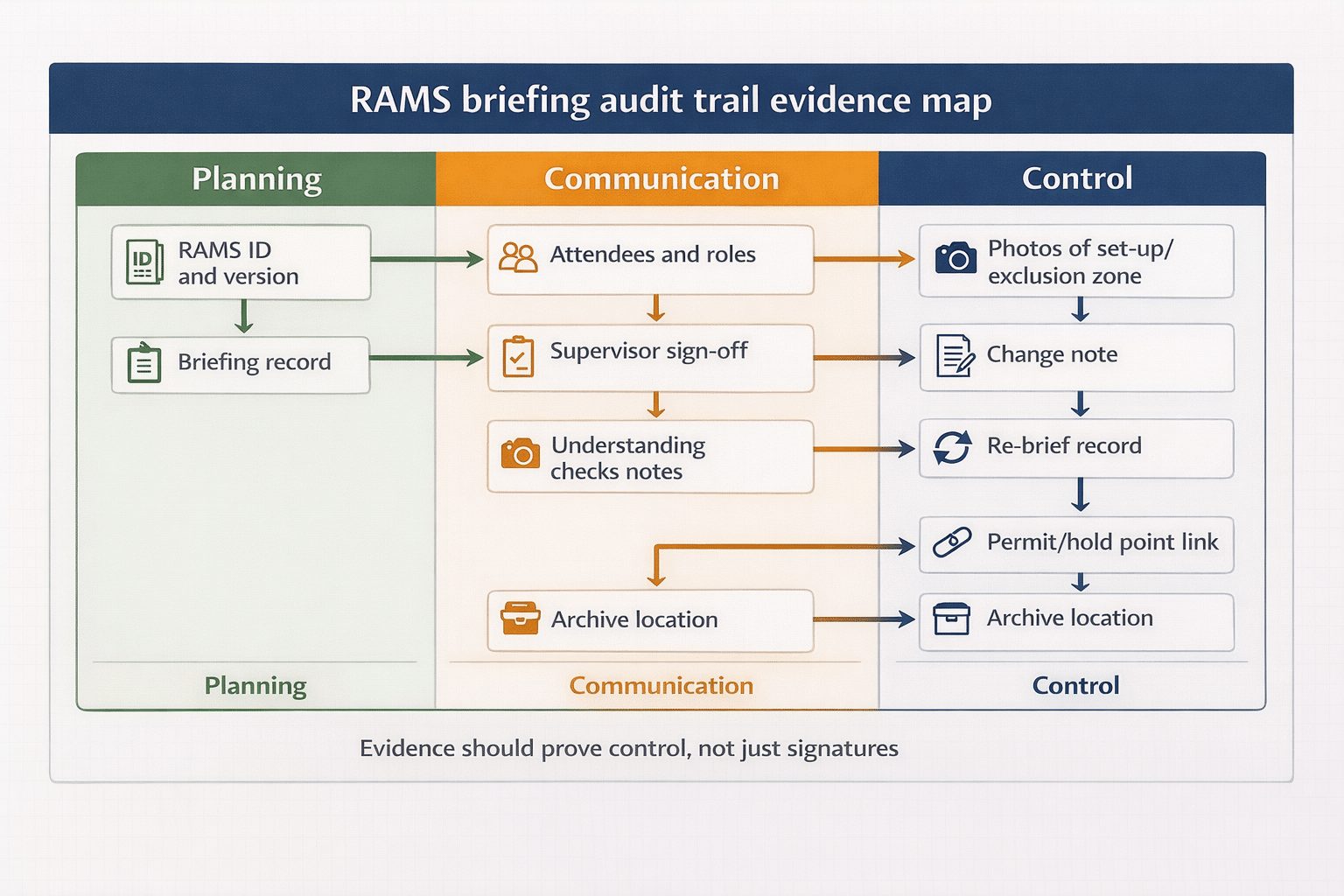
Attendance alone is not enough. You need to prove which revision was briefed, who attended, and that the supervisor confirmed understanding and sign-off.
For practical briefing mechanics, How to brief RAMS to site operatives provides a site-friendly approach to delivering briefings that people actually retain.

What evidence proves a RAMS re-brief happened
Evidence should prove control, not just document creation. As a minimum, aim to keep:
A change record linked to the revision
A simple log entry stating the trigger, what changed, and the date, linked to the RAMS revision identifier.
Proof of approval for the revised RAMS
An approval record that matches the revision that was issued. Avoid approving “a document” without a revision reference.
A briefing record tied to the revision
Your briefing record should state the RAMS ID and revision, the date and time, the briefer, attendees and roles, and supervisor sign-off.
Practical site evidence when controls change
If controls on site changed, such as segregation, signage, exclusion zones, or access arrangements, record a short note and, where appropriate, supporting photos as part of the site record process.
Common failures that cause audits, incidents, or client rejection
These are the patterns that usually sit behind “we updated it, but nobody knew”.
Silent edits with no re-issue
If you edit a document without changing the revision, you create ambiguity. Ambiguity is what auditors and investigators focus on.
Multiple current copies
If a site folder, a WhatsApp PDF, and a printed copy are all “current”, you will eventually brief the wrong version. The system must make it hard to do the wrong thing.
Re-briefing without explaining what changed
A good re-brief is concise and change-led. People need to know what is different, what controls have been added or strengthened, and what decisions they must make differently.
Evidence that does not link people to the revision
If the record does not state the RAMS revision, you cannot prove the briefing was for the approved copy. Tie the evidence to the version every time.
For a governance view of controlled revisions and approval evidence, **RAMS governance and version control helps you design the “one source of truth” approach that prevents these failures.
Frequently Asked Questions
Do I need to re-brief RAMS for minor wording changes?
Minor wording changes usually do not need a re-brief if they do not change the work method, site controls, or exposure. Record the update, keep version control clean, and be honest about whether the briefing message would change.
If only one subcontractor is affected, do I re-brief everyone?
Not necessarily. Re-brief the people whose task, controls, or exposure are affected, plus anyone managing the interface. The re-brief must be complete for those impacted, even if it is targeted.
What if the change happens mid-shift while work is underway?
Stop and stabilise the situation, apply interim controls if needed, and do not continue the affected activity until the revised RAMS is approved, issued, and the relevant people are re-briefed to that revision.
How do I prove which RAMS version was briefed?
Your briefing record should state the RAMS ID and revision, the date and time, attendees and roles, and supervisor sign-off. Link the briefing record to the issued revision and keep a clear archive trail for superseded copies.
A practical rule for re-briefing RAMS after changes
Re-briefing is about keeping the safe system real, current, and provable. Use three checks: does the change affect the method, does it change the controls, and does it change who is exposed. If any answer is yes, re-brief the affected people to the approved revision and capture evidence that links people to that version.
Next, tighten your process so the first question is never “which copy is current”. Start with the parent guide AI-generated risk assessments and method statements guide and ensure your change workflow makes one source of truth the default.
If you want RAMS revisions, briefings, and evidence to stay aligned without chasing paper, use a single controlled briefing workflow that always references the approved version.
See how Paperless Safety Briefings keep briefings tied to the approved RAMS revision
Download Your Free Briefing & Attendance Template
Ready-to-Use Briefing Sheet
Track attendance, signatures, and daily safety briefings with a free HSE-aligned record sheet for toolbox talks, inductions, and site audits.


