

RAMS governance and version control
Introduction
RAMS governance and version control is the difference between “we wrote RAMS” and “we can prove the right RAMS was used on site”. If you have multiple revisions floating around, operatives can brief off an outdated method, supervisors can approve the wrong version, and your audit trail becomes guesswork.
This guide explains a simple, repeatable governance model you can run on any UK site: how to number versions, who approves what, what triggers a revision, how to manage briefings after change, and what evidence you should be able to produce in an audit. For the wider RAMS lifecycle, see the parent guide: RAMS in construction guide.
Quick Answer..
RAMS governance and version control is the set of rules and workflow that ensures the correct RAMS version is created, reviewed, approved, issued, briefed, updated when conditions change, and then archived with evidence. In practice, it means: one source of truth, clear revision IDs, named approvers, a change log, and re-brief triggers.
RAMS governance and version control: what “good” looks like on site
A workable governance standard is easy to explain in one minute to a supervisor:
-
One current version: everyone can find it, and only that version is “live”.
-
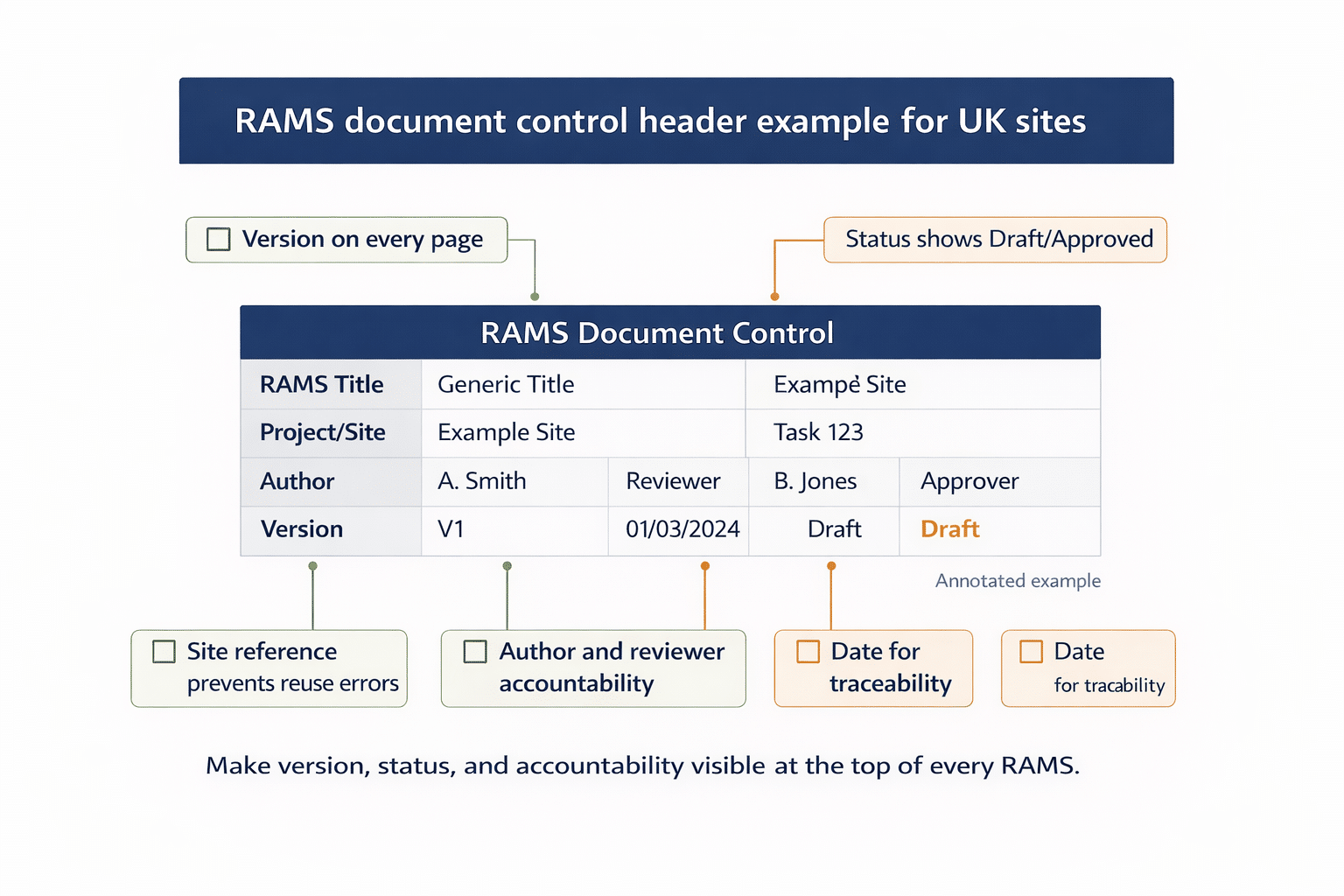
Clear revision identity: version number, date/time, author, and status (Draft, For Review, Approved, Superseded).
-
Defined roles: who drafts, who reviews, who approves, who issues to site, who triggers changes.
-
Controlled distribution: a single place for access, and a rule that printed copies must show revision ID and be withdrawn when superseded.
-
Evidence by default: approvals, briefings, and changes are recorded against the RAMS record.
How to structure your RAMS version naming so nobody gets confused
Pick one versioning pattern and enforce it. Two common options:
Option A: Simple revision numbering (recommended for most teams)
-
RAMS ID: Project or package code + task short name
-
Revision: Rev 00, Rev 01, Rev 02
-
Status: Draft, Approved, Superseded
-
Date: approval date and issue date (if different)
Example: PKG-014 Demo Works | Rev 02 | Approved | 16 Feb 2026
Option B: Major/minor versions (use when changes are frequent)
-
Major changes: scope, sequence, plant, principal hazards, control strategy
-
Minor changes: typos, clarifications, formatting
Example:Rev 2.1,Rev 2.2,Rev 3.0
Minimum fields to show on every page (including prints)
-
RAMS title and unique ID
-
Current revision and status
-
Approved by (name and role)
-
Approval date
-
“Supersedes Rev X” line
A practical RAMS approval workflow that supports governance
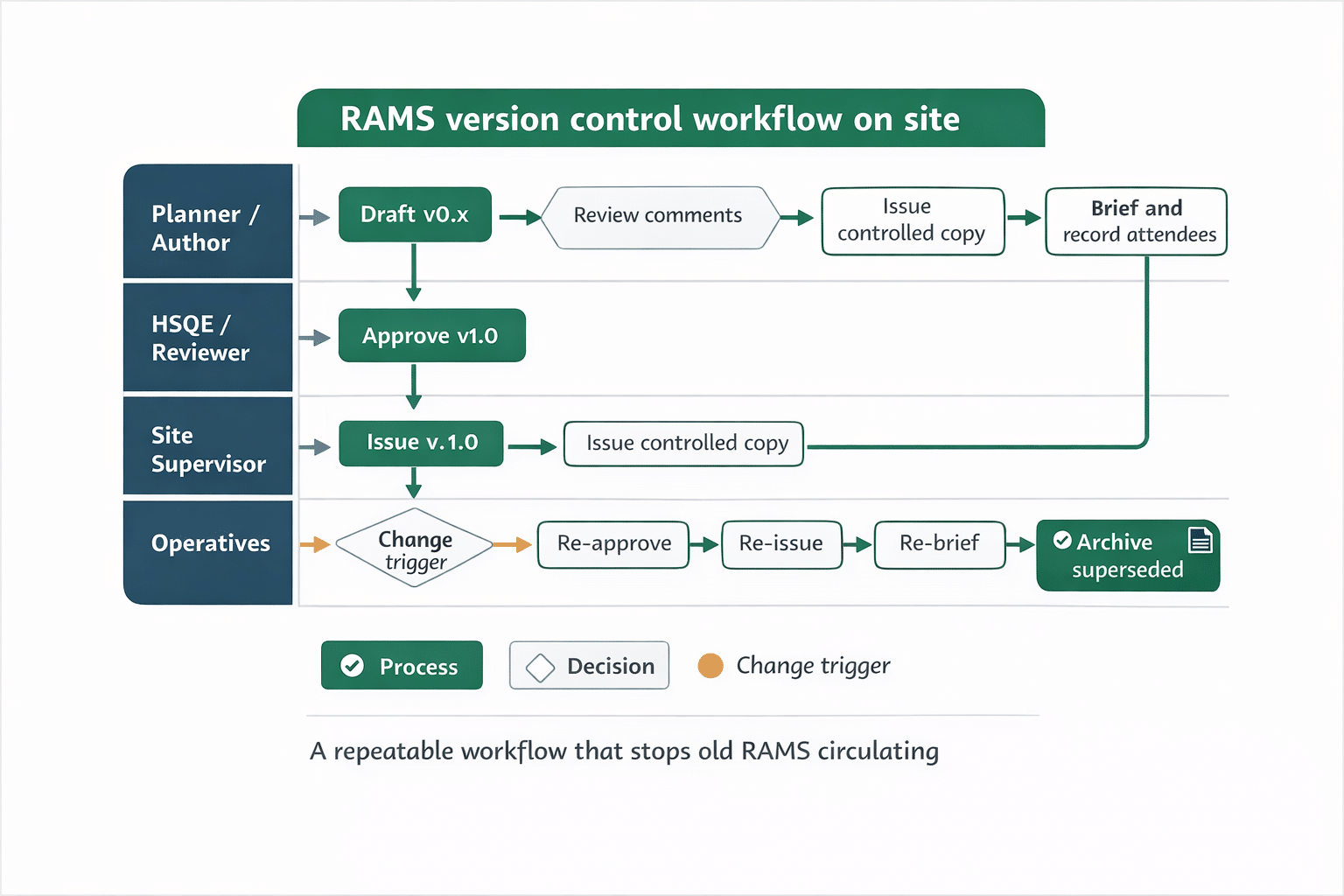
Governance fails when approvals are informal or spread across emails and PDFs. Keep the workflow consistent:
Step 1: Draft and internal QA check
-
Author completes RAMS with task scope, hazards, controls, method steps, roles, and hold points.
-
Quick QA: is the revision ID present, and are interfaces and assumptions clear?
Step 2: Review for buildability and site realism
-
Supervisor or delivery lead checks sequencing, plant, access, permits, logistics, and resources.
Step 3: HSQE or competent reviewer check
-
Checks hazards, controls, and briefing clarity.
-
Confirms the RAMS is suitable for the task and audience, not just “technically complete”.
Step 4: Approval and release
-
Approval captures: approver name, role, date/time, and any conditions.
-
Once approved, the RAMS becomes the source of truth for briefing and delivery.
Contextual next step (if you want the workflow end-to-end): RAMS construction guide.
Download Your Free Briefing & Attendance Template
Ready-to-Use Briefing Sheet
Track attendance, signatures, and daily safety briefings with a free HSE-aligned record sheet for toolbox talks, inductions, and site audits.
RAMS change control: what triggers a new version and a re-brief
The most common governance gap is updating the document but not controlling the rollout. Define triggers that force a revision and re-brief.
Typical triggers for a RAMS revision
-
Scope change (new activity, new area, new interfaces)
-
Sequence change (different method, temporary works changes, different access/egress)
-
New plant, tools, or substances
-
Significant change to workforce, supervision, or competence assumptions
-
New hazard identified or control no longer effective
-
Incident, near miss, or learning event that impacts controls
-
Permit requirements change or new constraints appear
Re-brief rules that are simple and enforceable
-
Major revision: always re-brief all affected operatives before work continues.
-
Minor revision: re-brief only the impacted team, but still record it.
-
Shift handovers: re-brief new starters and anyone not present at the last briefing.
Keep a change log that answers the audit questions
Your change log should capture:
-
What changed (plain language)
-
Why it changed (trigger)
-
Who approved the change
-
Who was re-briefed and when
The minimum audit trail for RAMS governance and version control
If someone asks “prove control”, you should be able to produce these items quickly:
Planning evidence
-
Current approved RAMS with revision history
-
Approval record (who, when, status)
-
Supporting documents if used (permits, drawings, inspection records)
Communication evidence
-
Briefing record showing revision briefed
-
Attendance list with names and signatures (or digital acknowledgement)
-
Records of re-briefs after revisions
Control evidence
-
Change log and superseded version archive
-
Close-out note (when task completed, what was learned, what was archived)
If you also need a structured briefing record, you can use a dedicated briefing template that captures revision ID and attendee confirmation.
Common version control mistakes and how to prevent them
Mistake 1: Issuing PDFs by WhatsApp and email with no withdrawal rule
Control: one controlled location, plus a “superseded copies must be destroyed or marked obsolete” rule.
Mistake 2: Revision exists but site is still briefing Rev 00
Control: briefing form must include RAMS ID and revision, and supervisors check it before starting.
Mistake 3: “Quick tweak” on site with no approval
Control: any change to method, plant, sequence, or controls triggers a formal revision and approval.
Mistake 4: No linkage between RAMS, permits, and inspections
Control: reference hold points in the RAMS and link evidence to the RAMS record set.
Frequently Asked Questions
Do we need to re-brief RAMS every time the document changes?
Yes if the change affects scope, sequence, plant, hazards, or controls for the people doing the work. For minor editorial changes, you can limit the re-brief to those impacted, but still record that the updated revision was communicated.
What is the simplest way to stop operatives using an old RAMS?
Make the current RAMS easy to access in one place, and make the briefing record mandatory with the RAMS ID and revision on it. If the briefing record references Rev 02, Rev 01 stops being usable in practice.
Should we keep superseded RAMS versions?
Yes. Keep superseded versions as “read-only” archive records so you can show what was approved and used at the time, alongside what changed and why. Do not allow archived versions to be mistaken for live versions.
Who should approve a RAMS revision?
Use named roles, not job titles in the abstract. Typically: the delivery lead checks buildability and sequencing, and a competent reviewer checks hazards and controls, with a defined approver who releases the RAMS to site as “Approved”.
A site-ready RAMS governance checklist you can actually run
If you want RAMS governance and version control to work on real sites, keep it operational:
-
One source of truth, with one current approved revision
-
Clear revision naming plus approval and issue records
-
Change triggers and re-brief rules that are enforced every time
Next step: use the parent guide to map this into your full RAMS lifecycle and documentation set: RAMS in construction guide.
Download Your Free Method Statement Template
Build Clear Method Steps Faster
Use a practical, site-friendly template to document sequence, roles, plant, and controls for clear briefings and easier site delivery.


