

Digital Permit to Work System for Construction
Control permits with clear approvals and linked records
Permits to work are only effective when the permit, approvals, and supporting documents stay consistent for everyone involved. Paperless helps construction teams run a structured digital permit to work workflow so authorisation is clear, records do not fragment, and the live permit reflects what is happening on site. This capability sits within RAMS & Safety Briefings</b, giving supervisors and managers a single place to keep permit evidence organised for reviews and audits.
 Reduce delays chasing approvals
- Keep one controlled permit record
- Store documents with the permit
- Confirm briefings were delivered
- Retrieve evidence fast for audits

Permit control that stays consistent
Permit to work processes break down when information lives across emails, messages, and scattered files. A digital permit to work system keeps the permit scope, controls, supporting documents, and authorisations together so the right people can review and approve without guesswork. It also reduces the risk of teams working to an outdated permit by making the current status visible and the latest record easy to access. This page focuses on permit control as a single capability: how permits are created, approved, briefed, and closed in a way that stays practical for day-to-day site delivery.
Clear approval workflow
Route permits without chasing people
Approvals fail when it is unclear who must authorise, what they are approving, or what the current status is. A digital permit workflow keeps the approval path structured so permits move from draft to submitted to approved with less back and forth. It helps ensure the approver sees the same scope, controls, and attachments the site team will rely on.
- Make approval ownership clear
- Reduce delays and rework
- Keep status visible to teams
- Ensure approvers see attachments
- Avoid informal approval gaps

One controlled permit record
Stop permits splitting into copies
Permit control weakens when multiple versions exist and nobody is sure which one is live. Keeping a single controlled permit record reduces confusion and helps supervisors, managers, and contractors align around the same scope and controls. It also makes it easier to close permits properly because closure checks and notes sit alongside the permit that was authorised.
- Reduce duplicate permit versions
- Keep the live permit obvious
- Prevent outdated permit use
- Improve shift handovers
- Simplify closure checks

Supporting documents linked to permits
Keep the permit pack together
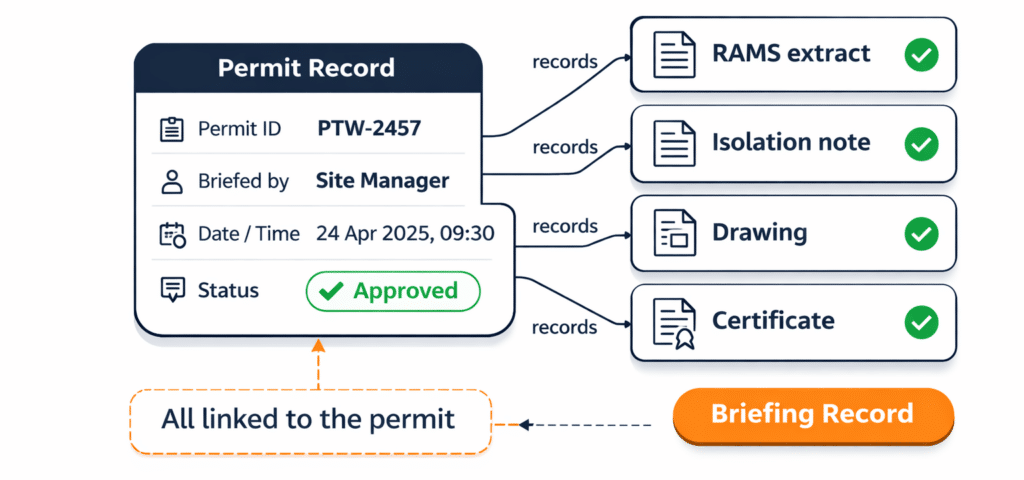
Permits often rely on supporting documents such as method statements, isolation notes, drawings, or certificates. When these are stored separately, reviews slow down and evidence is harder to retrieve later. Linking documents to the permit record helps approvers review the right pack and helps site teams access what they need without searching across folders and threads.
- Keep documents with the permit
- Reduce searching across systems
- Support faster permit reviews
- Lower risk of wrong attachments
- Improve evidence retrieval later
Brief the permit consistently
Confirm controls were communicated
A permit is not just a form, it is an authorisation that must be understood by the people doing the work. Capturing briefing confirmation strengthens the permit record by showing that the right message was delivered to the right people at the right time. Consistent briefing reduces misunderstandings and helps supervisors maintain control.
- Prove who was briefed
- Reduce on-site misunderstandings
- Support consistent supervisor delivery
- Keep briefing tied to the permit
- Strengthen closure and review records


See How Construction Teams Use Paperless
Explore real project examples showing how contractors have used Paperless Construction to improve site processes and manage project records.
Discover the challenges, workflows and practical outcomes behind each customer story.
Manage change without losing control
Update permits when conditions change
When scope, interfaces, or controls change mid-shift, the permit record should be updated so the authorised work still matches reality. A controlled digital workflow helps keep changes visible and reduces the risk of continuing under an outdated authorisation, improving clarity for later reviews.
- Keep permits aligned to site reality
- Reduce outdated authorisation risk
- Make changes visible to teams
- Support better supervisor decisions
- Improve clarity for audits and reviews

How a digital permit runs
A simple workflow from draft to closure
-
Create the permit with scope, work area, timing, and controls
-
Attach supporting documents required for review
-
Submit the permit for authorisation by the right role
-
Approve the permit and make status clear
-
Brief the team and record confirmation
-
Close the permit with required checks and notes

Who uses permits to work
Teams that need controlled authorisation on site
-
Site managers and supervisors
-
HSEQ managers
-
Project managers
-
Operations leadership
-
Subcontractor coordinators
-
Authorising managers and duty holders

Records that stand up to review
Keep permit evidence complete and retrievable
Permits are commonly reviewed during audits, client checks, and incident investigations. A structured digital permit record supports governance by keeping the permit scope, authorisation status, supporting documents, and briefing confirmation together, reducing the need to rebuild evidence from scattered sources.
Rollout notes for permit workflows
Start with permit types, fields, and approval roles
Most teams start by agreeing permit types, minimum required fields, and approval roles. Keep early adoption simple by using structures teams already recognise, then tighten consistency once the workflow is embedded.
Permit to work FAQs
What is a digital permit to work system
A structured way to create, authorise, brief, and close permits using a single controlled record that keeps details, documents, and sign-off evidence together.
Who approves a permit to work on site
Approval depends on your governance model, but it should be a defined authorising role. A clear approval path reduces delays and avoids informal approvals.
What should a permit to work record include
Typically scope, work area, timing, controls, interfaces, authorisation status, supporting documents where required, briefing confirmation, and closure checks.
When should a permit be updated or reissued
When conditions change in a way that affects scope, interfaces, or controls. Updating the live record reduces the risk of continuing under outdated authorisation.
See permits in the wider workflow
Permits to work work best when they sit inside a wider briefing and control process, not as an isolated form. If you want the broader context on how permits relate to RAMS, briefings, and on-site control, return to the parent capability page. Read more about RAMS & Safety Briefings here: RAMS & Safety Briefings
See How Paperless Could Work for Your Sites
Less admin. Clearer records. More control.
Book a personalised demo and see how Paperless can help your teams manage workforce, compliance and site records in one connected platform.