

RAMS change control on site

Introduction
If you want the full end to end context on what good RAMS should contain and how it fits into project delivery, start with the parent guide first: Ultimate Guide to RAMS in Construction.
On a live site, change is normal. Deliveries shift, access routes move, plant availability changes, trades overlap, and the sequence you planned on paper rarely survives first contact with reality. The risk is not that changes happen. The risk is that they happen informally, without updating controls, without re-briefing the people exposed, and without leaving a traceable record of what changed and who approved it.
RAMS change control on site is the discipline that stops “workarounds” becoming uncontrolled risk. It is a repeatable process for identifying a change, assessing impact, revising the RAMS, securing the right approval, re-issuing the latest version, re-briefing affected teams, and retaining an audit trail that stands up in an incident review or audit.
This guide gives you a practical, site-ready change control procedure you can run mid-task, including re-brief rules, minimum evidence, and the common failure points that create “shadow RAMS” across printouts, PDFs, and WhatsApp threads.
Quick Answer..
RAMS change control on site is the process for handling any change that affects the method, hazards, controls, people, plant, access, sequencing, or interfaces. In practice it means: pause and assess the change, revise the RAMS, get the right approval, issue the latest version to the team, re-brief anyone affected, remove or archive old copies, and keep a simple audit trail of what changed and why.
What RAMS change control means and what counts as a change on site
A “change” is anything that alters exposure to risk or the controls you are relying on. That can be obvious, like swapping a MEWP for a scaffold tower, or subtle, like moving the workface closer to a live interface.
Common change triggers you should treat as a RAMS review
Use this as a practical trigger list:
-
Method change: different technique, tools, or work sequence
-
Plant change: different lifting arrangement, different access equipment, substitute plant
-
People change: new supervisor, new subcontractor gang, competence gap, night shift switch
-
Interface change: overlapping trades, revised exclusion zone boundaries, changes to traffic routes
-
Access change: new route, different edge protection, altered temporary works, revised egress
-
Environment change: weather exposure, ground conditions, nearby public interface, lighting changes
-
Permits and hold points: new permit requirements, altered inspection regime, revised temporary works checks
If any of those changes occur, assume the briefing you gave is no longer sufficient until proven otherwise.
What is not a RAMS change and how to record it
Not every site note requires a RAMS revision. Examples that may be recorded as a supervisor note (depending on your governance) include:
-
housekeeping adjustments that do not alter exposure or controls
-
minor sequencing tweaks within the already-defined safe method
-
clarifications that do not change the risk assessment or control set
The moment a note introduces a new hazard, removes a control, changes who is exposed, or changes the method, it stops being a note and becomes change control.
Who raises, reviews, and approves RAMS changes
Change control fails when responsibilities are vague. A simple model:
-
Supervisor / Site Manager: identifies change, stops work if controls are impacted, triggers revision
-
Planner / Engineer / RAMS author: updates the RAMS content, including method steps and controls
-
HSQE / Reviewer: checks control adequacy and governance, confirms evidence requirements
-
Approver (as defined by your company or project rules): signs off the revision before restart
-
Operatives and subcontractors: confirm understanding at the re-brief and work to the latest version
Where subcontractors supply their own RAMS, your change control still needs a “site gate” so that subcontractor changes are reviewed against site interfaces and site rules before work restarts.
If you want a deeper view of briefing practice and proof of attendance, link into your briefing workflow guidance:
how to brief RAMS and prove attendance.
Step-by-step RAMS change control procedure for a live site
This is a site-ready workflow you can run mid-task.
Step 1: Identify the change and decide if it impacts controls
Ask three questions:
-
Does this change the method?
-
Does this change exposure (who, where, when, how close to interfaces)?
-
Does this change controls (what prevents harm, and how you prove it)?
If the answer is yes to any, treat it as a controlled revision.
Step 2: Apply the restart gate
If controls are impacted, pause the activity. You do not need drama, you need discipline. The restart gate is simply: no restart until the latest RAMS revision is approved and briefed.
Step 3: Revise the RAMS with the change explicitly captured
Minimum update set:
-
updated method steps reflecting the new sequence
-
updated hazards and control measures where exposure changed
-
updated roles and responsibilities if supervision or competence changed
-
updated plant, access, exclusion zones, interfaces and hold points
Where you are running digital RAMS, versioning and distribution should be simpler to control:
digital RAMS version control on site.
Step 4: Review and approve
Use a short approval checklist:
-
are controls still effective and practical in the new conditions?
-
have interfaces been re-checked (traffic routes, adjacent trades, public areas)?
-
are permits, inspections, or temporary works checks aligned with the change?
-
is the revision clearly versioned and dated, with the approver recorded?
Step 5: Issue the latest version and remove ambiguity
This is where “shadow RAMS” are born.
-
Issue one current version with a clear identifier
-
Withdraw or clearly mark superseded copies
-
If using printouts, remove old copies from the point of use, not just from the office
Step 6: Re-brief affected people and record attendance
Brief the revision, not the whole RAMS again unless necessary. Keep the re-brief short, focused on what changed, and verify understanding.
For contractor-heavy sites, this guidance is useful for governance and consistency:
contractor RAMS briefing process.
Download Your Free Briefing & Attendance Template
Ready-to-Use Briefing Sheet
Track attendance, signatures, and daily safety briefings with a free HSE-aligned record sheet for toolbox talks, inductions, and site audits.
Re-briefing rules after RAMS changes
The practical rule is: re-brief when the control set changes or exposure changes.
When you must re-brief
Re-brief is normally required when you have:
-
new controls introduced, controls removed, or controls altered
-
different plant or access method
-
change in exclusion zone, lifting plan constraints, or interface management
-
change in sequence that introduces new simultaneous operations
-
new people joining the task, including a new supervisor or a new subcontractor gang
Who attends the re-brief
Include:
-
everyone doing the task
-
anyone supervising the task
-
anyone working inside the affected interface zone
-
new starters or late arrivals joining the activity
-
subcontractors whose work is now overlapping
If your site already has compliance checks embedded, align the re-brief record to your compliance expectations: site RAMS compliance checks.
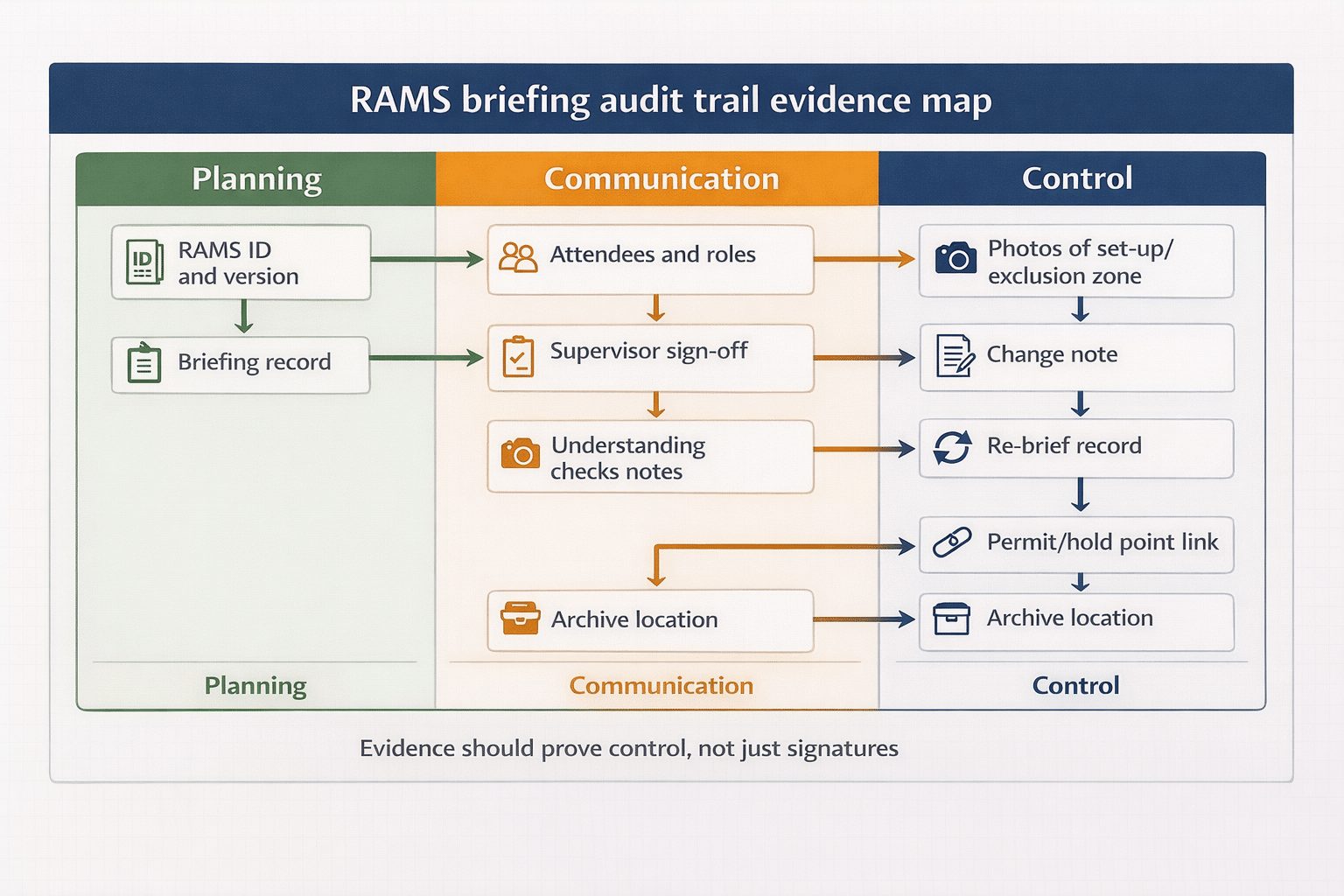
Minimum audit trail for RAMS change control
You do not need a mountain of paperwork. You need a clean, connected trail.
Minimum artefacts to capture
-
RAMS version ID (number, date/time, author)
-
Change log entry (what changed, why, when, who requested)
-
Approval record (who approved and when)
-
Briefing record (who attended, when, and which version was briefed)
-
Linked permits and inspections if the change affects them
-
Archive of superseded versions so you can prove what was live at the time
If you are using structured inputs to generate or revise RAMS faster, keep the governance steps unchanged. Speed helps only if the controls and approvals remain intact:
faster RAMS updates with structured inputs.
Common RAMS change control failures and how to prevent them
Failure 1: “We changed it on WhatsApp”
Fix: define one controlled distribution route. If it is not issued through that route, it is not live.
Failure 2: A RAMS revision is approved, but old copies stay in use
Fix: assign a named person to remove superseded copies and confirm withdrawal at the workface.
Failure 3: Re-brief recorded, but not linked to the correct version
Fix: briefing record must reference the RAMS version ID. This is non-negotiable for traceability.
Failure 4: Controls updated, but permits and inspections are not
Fix: treat permits and inspections as dependent artefacts. If controls change, check whether permits, inspections, or hold points must change too.

Worked example: method change mid-task
Scenario: You planned to access a workface using a scaffold tower. The tower cannot be positioned due to ground conditions, so a MEWP is proposed.
Change control run:
-
Supervisor identifies the change impacts access method and fall prevention controls. Activity pauses.
-
RAMS is revised: access method changes, MEWP specific hazards and controls added, exclusion zone and interface controls updated.
-
Approval is obtained per project rules.
-
Latest version is issued, and old RAMS copy at the workface is removed.
-
Re-brief covers: MEWP operating controls, exclusion zone, rescue arrangements if relevant, interface management, and who is authorised to operate.
-
Briefing record is captured against the new RAMS version.
This is exactly the type of change that creates “it was only a quick swap” incidents if you do not apply the restart gate.
Frequently Asked Questions
What triggers RAMS change control on site?
Any change to method, sequencing, plant, access, people, interfaces, or controls. If exposure or control effectiveness changes, trigger a revision.
Who approves RAMS changes?
It depends on your company and project governance. At minimum, the revision should be reviewed and approved by the role defined as the RAMS approver for that scope, with HSQE involvement where required by your rules.
Do you need to re-brief RAMS after a change?
Yes, when the change affects controls or exposure. Re-brief everyone affected and record attendance against the revised version.
How do you prevent people using old RAMS versions?
Issue one current version with a clear identifier and withdraw superseded copies from the workface. Digital distribution helps, but you still need a named withdrawal responsibility.
What is the minimum evidence for an audit trail?
Version ID, change log, approval record, briefing record referencing the correct version, and archived superseded versions.
Turning RAMS into a repeatable process on site
RAMS change control on site is not a paperwork exercise. It is a control system that stops informal changes turning into uncontrolled risk. If you apply a simple restart gate, keep versioning unambiguous, re-brief based on control impact, and retain a minimum audit trail, you will improve safety performance and make audits and incident reviews far less painful.
If you want a simpler way to issue consistent RAMS versions and keep changes traceable, explore Paperless RAMS workflows:
RAMS workflows and controls in Paperless.
If you want to generate a structured first draft quickly (then run the same approval and briefing governance), use the AI RAMS Generator:
Access the AI RAMS Generator.

Using ChatGPT for RAMS?
Draft Faster. Review Site Risks Properly.
Get access to our free RAMS generator now.


