

How do you control versions of RAMS on site?
Introduction
If you have ever had a supervisor holding one copy of the RAMS while operatives are working from an older printout, you will understand why “how do you control versions of RAMS on site” matters. Version control is not about paperwork for its own sake. It is about making sure everyone is working to the same method, with the same controls, on the same day. If you want the wider context on RAMS governance, approvals, briefings and audit readiness, start with the main guide here: Ultimate Guide to RAMS in Construction.
This blog then gives you a practical, site-friendly version control method you can run daily, including a simple naming convention, a master register, controlled issue, what to capture in approvals and change logs, and when changes must trigger re-issue and re-briefing. It is written for real site conditions where changes happen, people rotate, and documents move between office and site.
Quick Answer..
Control RAMS versions on site by running a single “master” RAMS, assigning a clear version number, recording who approved it, and only issuing RAMS through one controlled route. If anything changes, publish a new version, mark the old one as superseded, and re-brief the people doing the work against the updated RAMS.
What “version control” means for RAMS on a live site
Version control is simply the discipline of ensuring the current RAMS is identifiable, accessible, and the only one being used. On a practical level, you want to be able to answer these questions quickly:
-
What is the latest approved RAMS version for this task
-
Who approved it and when
-
Who has been briefed on it
-
What changed since the last version
-
Where the superseded versions are, and how they are prevented from being used
For background and the wider RAMS process, link back to your hub page first:
Ultimate Guide to RAMS in Construction

A simple RAMS versioning method you can run every day
This is a practical method you can adopt as an internal site rule. Keep it simple enough that it actually gets followed.
1) Use a consistent version naming convention
Pick one convention and do not deviate. For example:
-
RAMS ID: ProjectCode-TaskCode
-
Version: v0.1 draft, v1.0 approved, v1.1 minor change, v2.0 major change
The key is that the version number is visible on the front page of the RAMS, not buried in a footer.
2) Maintain a one-line “master register”
A register can be as simple as a single list that tells everyone what is current. Minimum fields:
-
RAMS ID
-
Task name
-
Current version
-
Approval date
-
Status (Draft / Approved / Superseded)
-
Where the master copy lives (system or folder name)
3) Lock down distribution
Decide how RAMS is issued on site and make it the only route. The most common failure mode is ad hoc printing and forwarding.
A workable rule is:
-
Only the document controller (or nominated supervisor) issues RAMS
-
The issued RAMS includes the version number in the filename and on page 1
-
Superseded versions are marked clearly as “Superseded” and removed from active folders and noticeboards
Approvals and change logs that stand up to scrutiny
You do not need a complex system, but you do need consistency.
Approval record: what to capture
Minimum approval record fields:
-
RAMS ID and version
-
Approved by (name and role)
-
Approval date and time
-
Any conditions of approval (if applicable)
Change log: what to capture
Minimum change log fields:
-
From version and to version
-
What changed (plain English)
-
Why it changed (trigger)
-
Who made the change
-
Who approved the change
If you want to reduce rework, use the same change log format across every project.
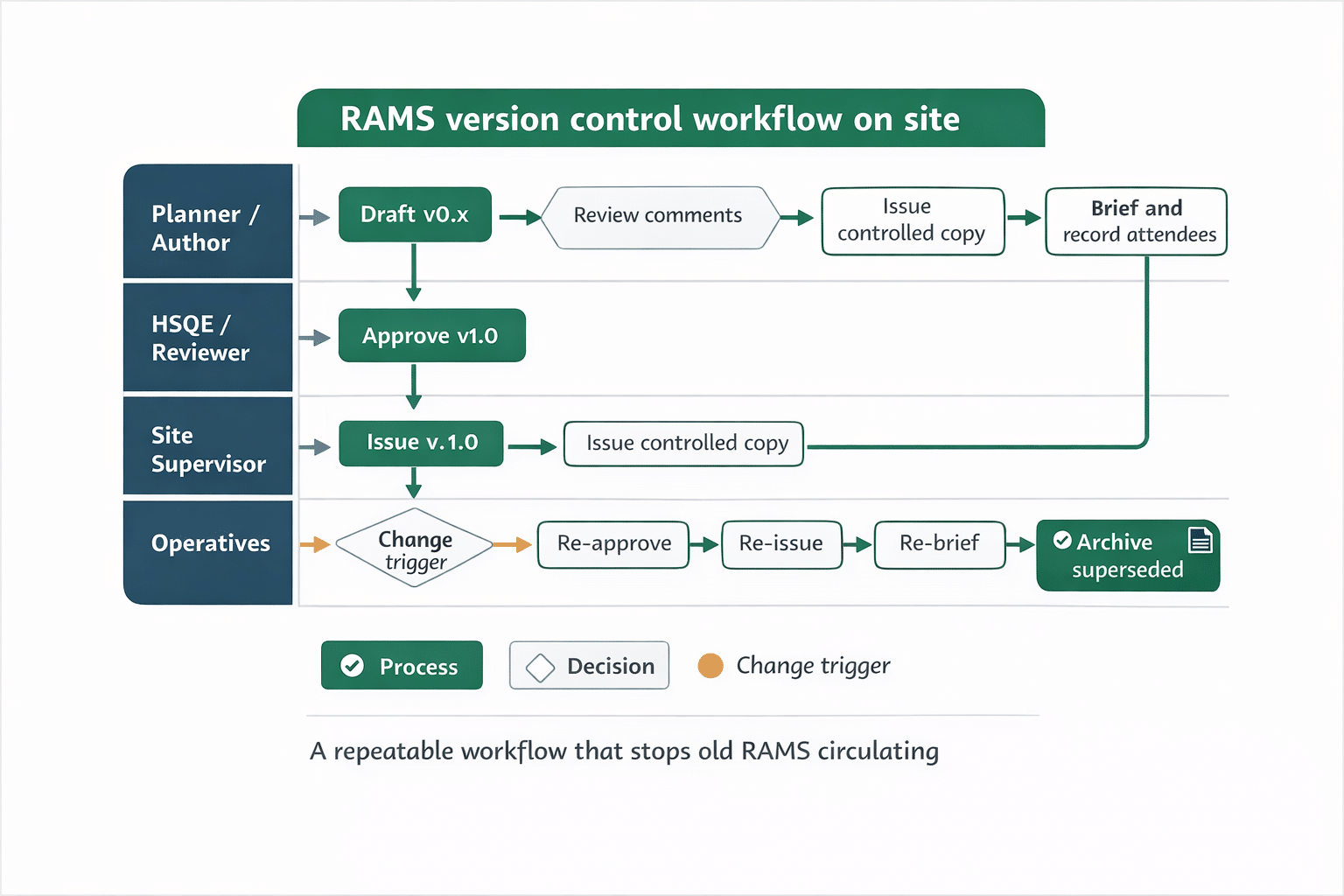
When to re-issue and re-brief RAMS
A simple operational rule keeps everyone aligned:
-
If the method changes, issue a new version and re-brief
-
If the controls change, issue a new version and re-brief
-
If the plant changes, issue a new version and re-brief
-
If the sequence changes, issue a new version and re-brief
-
If the workface changes in a meaningful way, treat it as a trigger to review, and if updated, re-brief
If you are digitising briefings and attendance capture, see:
Safety briefing and attendance
Download Your Free Briefing & Attendance Template
Ready-to-Use Briefing Sheet
Track attendance, signatures, and daily safety briefings with a free HSE-aligned record sheet for toolbox talks, inductions, and site audits.
Common on-site version control mistakes and how to prevent them
Mistake 1: Old prints left in cabins or on boards
Control: Remove and replace as part of issue. Mark old copies “Superseded” immediately.
Mistake 2: “Minor change” made without updating the version
Control: Any change equals a version increment, even if it feels small.
Mistake 3: Briefing record does not match the RAMS version
Control: Add the RAMS version number to the briefing record and enforce it.
Mistake 4: Multiple people editing different copies
Control: Only one editable master. Everyone else comments or requests changes.
For a broader look at digital RAMS usage on site, you can also reference:
Digital site RAMS

Frequently Asked Questions
What should be on the front page of a RAMS to make version control easier?
At minimum: RAMS ID, task name, version number, approval status, and the approval date so the workface can quickly confirm they are on the current document.
How do you stop operatives using an old RAMS printout?
Use a single controlled issue route, remove superseded copies during re-issue, and make the version number obvious so mismatches are spotted immediately during briefings.
When should a RAMS version number change?
Whenever anything that could affect the method, sequence, controls, plant, or working conditions changes. The key is consistency: one rule applied every time.
Do you need to keep superseded RAMS versions?
If you keep older versions, store them as “superseded” and separate from the live set, so they cannot be issued by mistake. The purpose is traceability without confusion.
Summary
Version control fails when RAMS behave like loose paperwork instead of controlled instructions. You can avoid most issues with a small number of repeatable rules: one master copy, a visible version number, a simple register, and a non-negotiable trigger that changes lead to a new version and a re-brief. If you implement that consistently, you reduce the risk of people working to the wrong method and you make it far easier to show what was approved and communicated at the time of the work.
Want to speed up creating and updating RAMS while keeping your documents consistent? Use the free tool here:
AI RAMS Generator
Download Your Free Method Statement Template
Build Clear Method Steps Faster
Use a practical, site-friendly template to document sequence, roles, plant, and controls for clear briefings and easier site delivery.


