

Digital RAMS Workflow for Construction Teams

Introduction
A digital RAMS workflow for construction teams is not just “RAMS in a PDF”. It is how you consistently create, review, approve, brief, update, and archive risk assessments and method statements so the right version is used on site.
This post breaks the workflow into practical stages you can apply on UK projects, from task definition through to change control and close-out. It also covers the points where teams typically lose control, including email-based approvals, unclear ownership, and operatives receiving outdated copies.
If you want the full end to end context on what good RAMS should contain and how it fits into project delivery, start with the parent guide first: Ultimate Guide to RAMS in Construction.
Quick Answer..
A digital RAMS workflow for construction teams is a controlled process for drafting RAMS, routing them for competent review and approval, briefing operatives on the approved revision, and managing updates through change control.
The aim is simple: the right people approve the right content, and the site team can only access and brief the current version, with a clear record of revisions, acknowledgements, and close-out.
What “digital RAMS workflow” means in practice
A workflow is the repeatable set of steps that moves RAMS from “needs writing” to “approved, briefed, and controlled”.
In a practical site setting, the workflow should answer four questions every time:
-
Who creates the draft, and what inputs are required
-
Who reviews and approves, and what competence is expected
-
How the workforce is briefed on the approved version
-
How changes are controlled when the job, scope, or conditions change
If your current process is mostly PDFs, emails, and manual signature sheets, the “workflow” exists, but it is usually informal and hard to audit. A digital workflow makes it explicit and repeatable.
For related context on briefings and digital safety documents, see: construction safety briefings and digital RAMS.
When a digital RAMS workflow matters most on UK sites
You feel the benefit most when the job has moving parts and frequent change, for example:
-
Multiple trades working in sequence or in parallel
-
Subcontractor RAMS needing review before start
-
Interface risks, including plant and pedestrian segregation
-
Night works, possessions, or restricted access windows
-
Temporary works, lifting operations, or confined areas
-
Works near live services or public interfaces
These are the conditions where version control and briefing evidence become the weak points. If you cannot show which revision was briefed, and who acknowledged it, you lose confidence quickly when something changes on site.
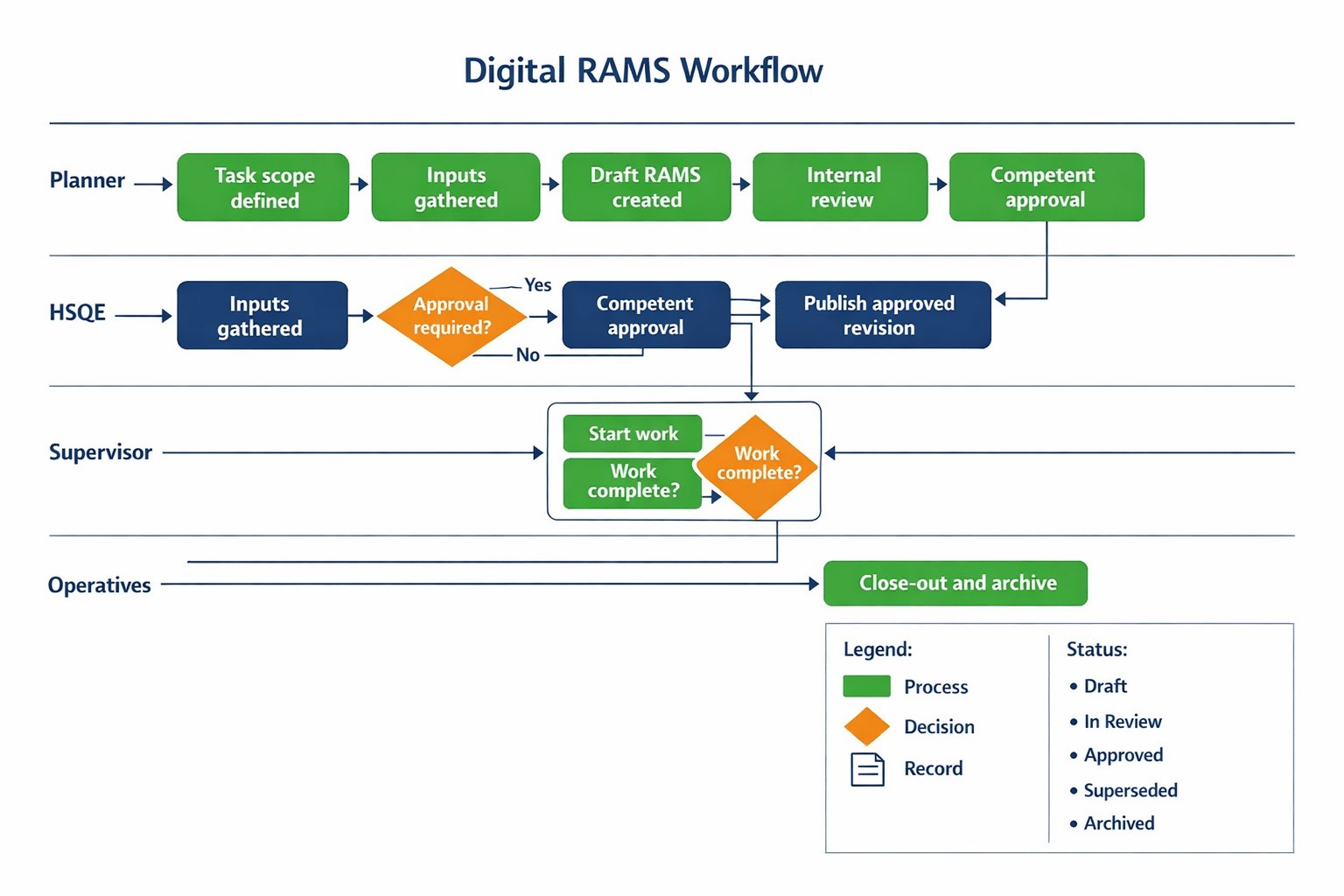
A step by step digital RAMS workflow for construction teams
A clean workflow can be run in eight stages.
1) Define the task and scope
Capture what the work is, where it takes place, and what is in and out of scope. The more specific the task definition, the easier it is to avoid generic controls that do not match the site.
2) Gather inputs that affect risk
Typical inputs include drawings, programme constraints, permit requirements, plant selection, access routes, and known hazards. If you rely on “we will sort it on the day”, your change control burden increases.
3) Draft the RAMS content
Build the risk assessment and method steps together so controls actually map to how the job will be delivered. This is where many teams drift into copying old RAMS without checking relevance.
4) Run an internal review
Check obvious gaps: missing hazards, unclear sequence, missing roles, or controls that cannot be implemented on that site.
5) Route for competent approval
Approval should be a defined step, not a reply in an email thread. Capture approver identity, time, revision, and any comments that drive changes.
6) Publish the approved version
Only publish the revision that has passed approval. Treat it as the controlled version, with a clear status such as Draft, In Review, Approved, Superseded, Archived.
7) Brief operatives on the approved revision
Brief the exact revision that is live, and capture acknowledgement against named people. If the job changes, briefing has to change too.
8) Manage changes and close-out
When the method changes, conditions change, or a new hazard appears, raise a change, revise, re-approve where needed, and re-brief. At completion, archive the final revision and the evidence trail.
If you need more on what “good” looks like from a compliance and audit perspective, see: site RAMS compliance.
Download Your Free Briefing & Attendance Template
Ready-to-Use Briefing Sheet
Track attendance, signatures, and daily safety briefings with a free HSE-aligned record sheet for toolbox talks, inductions, and site audits.
Roles, responsibilities, and approvals that keep the workflow moving
A workflow stalls when ownership is unclear. Keep it simple and explicit.
Author
Owns the draft quality and ensures inputs are captured.
Reviewer
Checks the job logic and whether controls match real site constraints.
Approver
Provides the competent sign-off and accepts responsibility for the approval decision.
Supervisor
Owns the briefing and ensures the method is followed, including changes.
Operatives
Confirm they have been briefed and raise issues when conditions differ.
You do not need more roles. You need clear accountability and a single path for escalation when something is blocked.
For a broader view of how RAMS supports delivery, see: the role of RAMS in project management.

Version control and change control on site
This is where many “digital” approaches fail. A file in a folder is not version control.
A workable approach includes:
-
One source of truth for the current approved revision
-
Clear revision numbering, with “superseded” status on old versions
-
A change trigger, such as design change, scope change, incident, near miss, different plant, or different access
-
A defined review and approval route for changes
-
A re-brief requirement when the change affects method, controls, or interfaces
-
A record of who was briefed on which revision
If you cannot answer “which version was briefed to this operative on this date”, your process is fragile.
Common mistakes in digital RAMS workflows and how to avoid them
Treating upload as control
Uploading a PDF does not stop someone using an old copy. Control needs status, revision, and distribution discipline.
Approvals that sit outside the record
If approval evidence is in emails or messages, the audit trail is fractured. Keep the approval inside the controlled record.
Briefings that cannot be traced to the revision
A signature sheet is only useful if it is tied to the specific RAMS revision and date. Otherwise it proves attendance, not understanding of the method.
Generic RAMS used without site checks
Generic content increases rework and change control. Drafts should be based on the actual task and site conditions.
No defined re-approval trigger
If changes happen and no one knows when to re-approve, revision control collapses.
Frequently Asked Questions
What is the difference between a digital RAMS workflow and a RAMS template?
A template is the structure of the document. A digital workflow is the process around it, including drafting, review, approval, briefing, change control, and archiving. A template without workflow still produces version confusion and weak briefing evidence.
Who should approve RAMS in a construction team?
The approver should be competent for the task and risk profile. The key is that the approval role is explicit, recorded against the revision, and not informal. If competence is unclear, treat it as a governance gap to fix, not a workaround.
When should RAMS be updated during the job?
Update RAMS when the scope, method, plant, sequence, or site conditions change in a way that affects risk and controls. A practical trigger list and a defined change process are more reliable than relying on judgement alone.
How do you prove operatives were briefed on the right RAMS version?
You need briefing evidence that includes the RAMS revision, date, and the names of the people briefed. If revisions change, you need re-brief evidence tied to the new revision, not the original document.
Turning RAMS into a repeatable process on site
A digital RAMS workflow for construction teams works when it is treated as a controlled process, not a document exercise.
Three things matter most:
-
One source of truth for the current approved revision
-
Clear review and approval ownership, with traceability
-
Briefings and re-briefings tied to the exact revision
If you want the full RAMS context, including what good RAMS should contain and how it supports delivery, return to: Ultimate Guide to RAMS in Construction.
See how a digital RAMS workflow can work day to day
If you want a practical way to create, approve, brief, and control RAMS without email chains and duplicate PDFs, start here: RAMS and Safety Briefings in Paperless Construction.
Download Your Free Method Statement Template
Build Clear Method Steps Faster
Use a practical, site-friendly template to document sequence, roles, plant, and controls for clear briefings and easier site delivery.


